Redesign · Next.js · Vercel

AirSupp: from Framer to a fast, custom site.

I rebuilt my dad’s owner-operated HVAC and heat pump website, moving it from Framer to a custom Next.js build on Vercel.

Framer → custom Next.js PageSpeed desktop 66 → 100, mobile 60 → 90

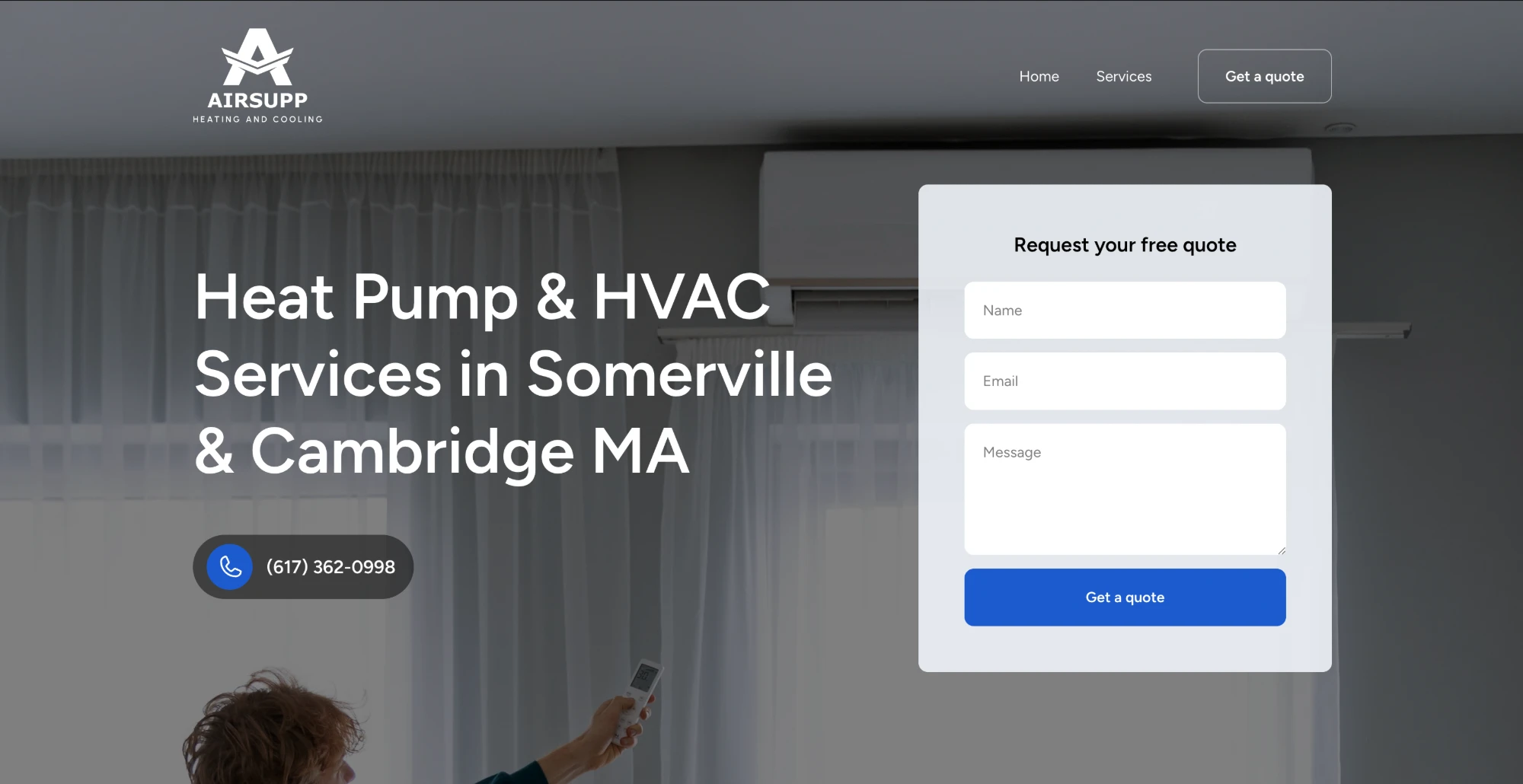
The old AirSupp homepage on Framer: a dark photo of a room with a heat pump, the headline “Heat Pump & HVAC Services in Somerville & Cambridge MA” and a quote request form.
Before · Framer
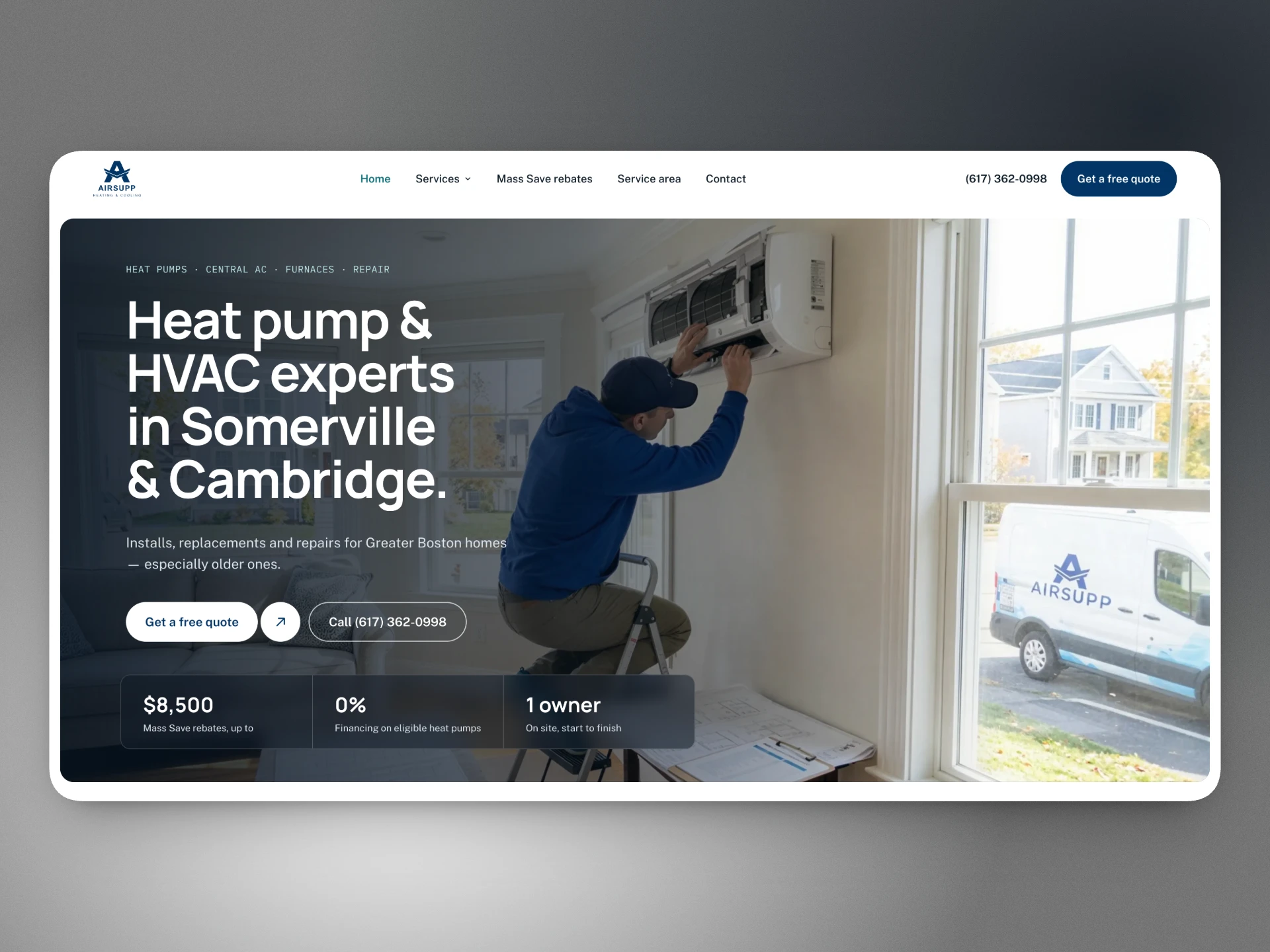
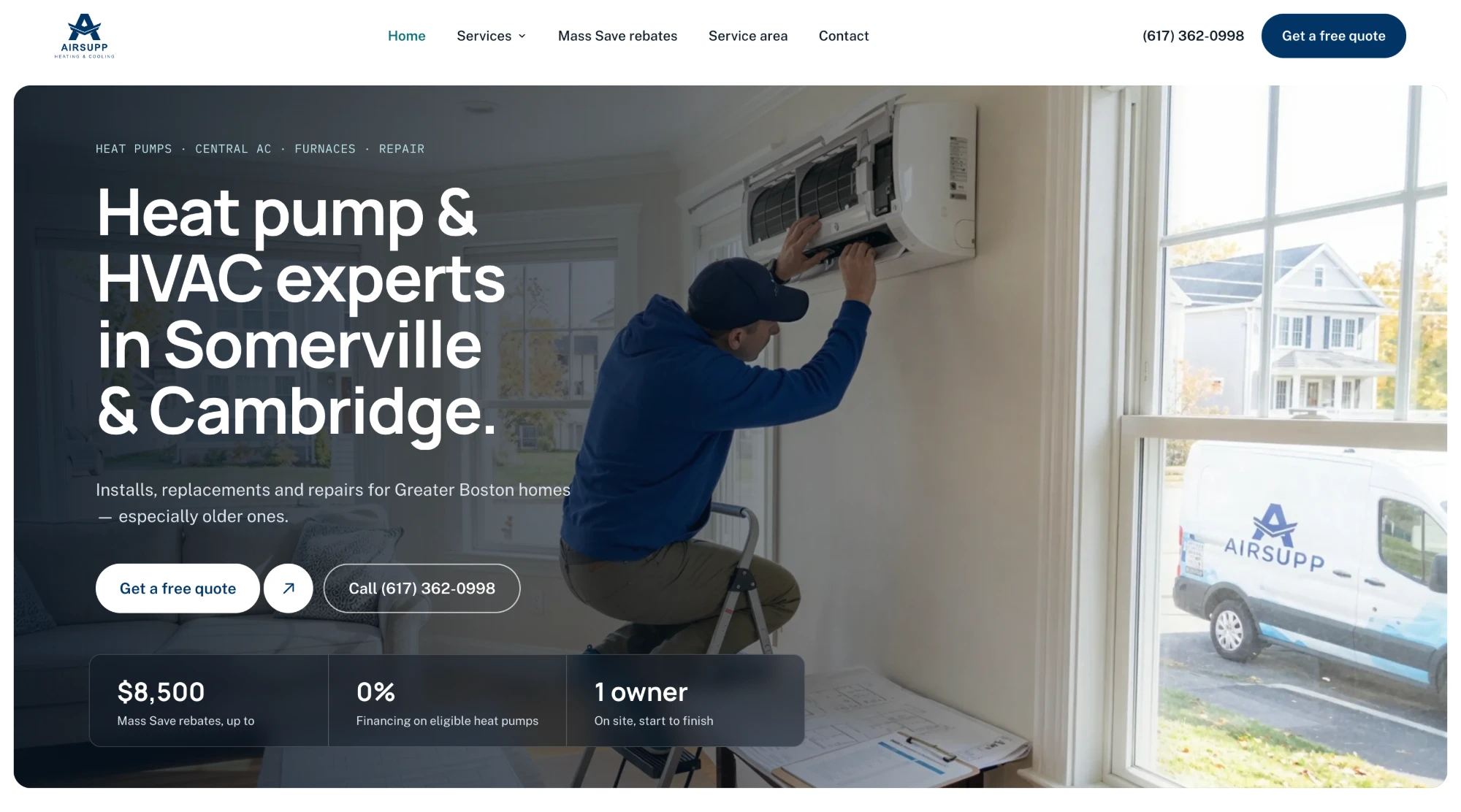
The new AirSupp homepage on Next.js: a photo of a technician servicing a heat pump, the headline “Heat pump & HVAC experts in Somerville & Cambridge” and three stat cards.
After · Next.js
Client
AirSupp Heating & Cooling (owner-operated)
My role
Design, front-end development, visual assets, launch
Timeline
September 2026
Stack
Next.js, React, TypeScript, Tailwind CSS, Vercel, Resend
Design and AI tools
Claude Design, Claude Code, Cursor, Gemini, Higgsfield (Kling 3.0)
Live site
airsupp.org (opens in a new tab)
The story

This project was a thank-you.

In 2018, my dad gave me the chance to take my first web development course. Eight years later, I used those skills to rebuild his business website.

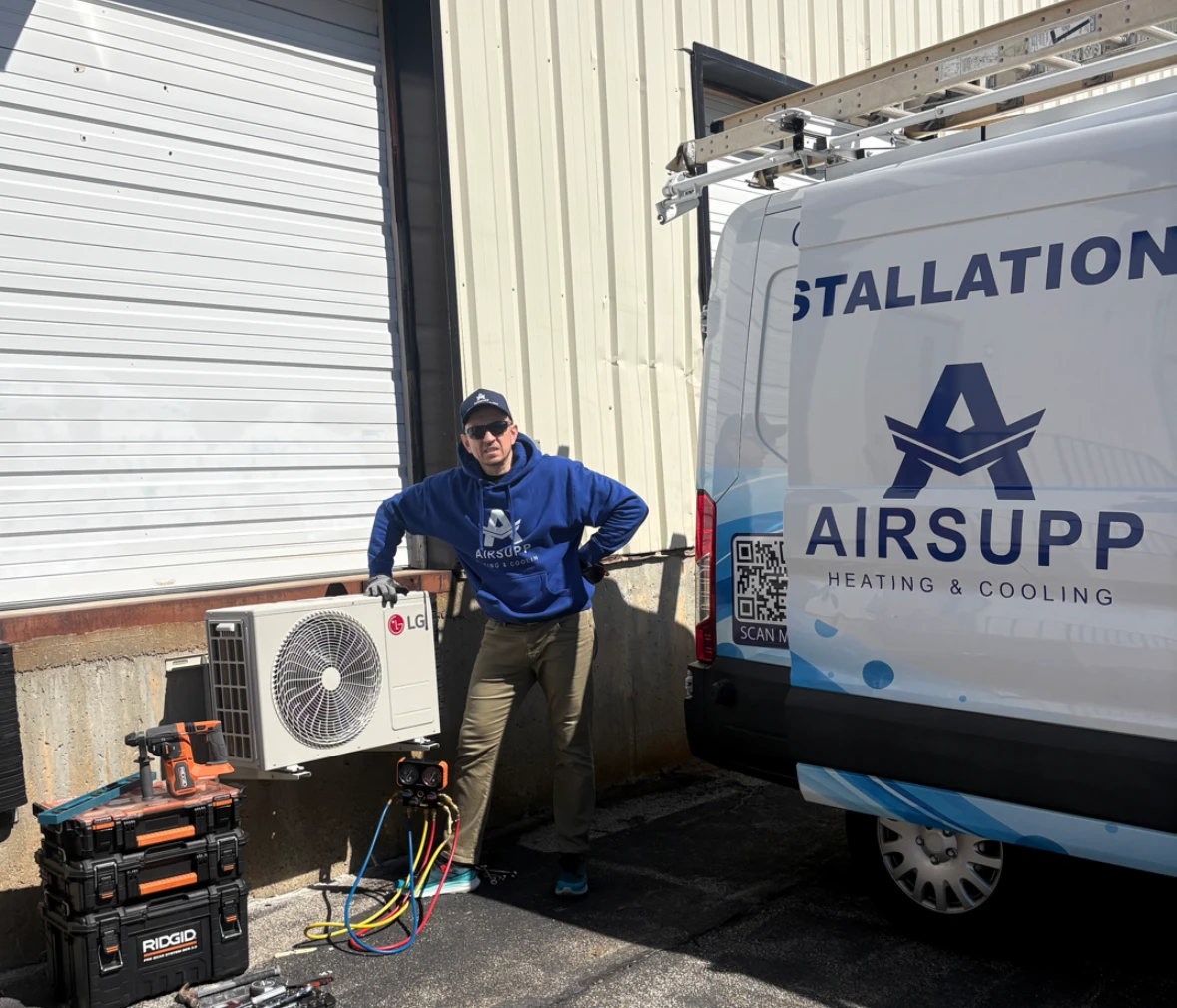
He quotes every job, does every install and answers the phone himself. “Owner Operated” is written on the side of his van. The old site didn’t show any of that, so my goal was to make the real person behind the business visible.

My dad, the owner of AirSupp, standing beside an outdoor heat pump unit and the AirSupp van.
The owner, on a job.
Problem and goal

One job: quote requests and phone calls.

The site exists to bring in quote requests and calls from Greater Boston homeowners, most of them on mobile.

Problem on the old Framer site

  • Template-like design that didn’t show the owner
  • HVAC photos with leftover template alt text (“Carpentry”, “Handyman services”)
  • Duplicate H1s from Framer breakpoints
  • Broken footer links, unlinked services
  • No LocalBusiness structured data
  • Slow on mobile (performance 60)
  • Hard to understand rebates

Goal for the rebuild

  • Real photos and his own words, front and center
  • Accurate alt text on every image
  • One H1 per page, semantic structure
  • Clean navigation, every service reachable
  • HVACBusiness and Service schema
  • Fast on every device
  • A Mass Save eligibility checker

The constraint: the owner’s copy stays as written. Every line was approved by him, and the design adapted to the text, not the other way around.

Process

Eight phases, each one committed.

I reviewed and committed every phase before starting the next, so any step could be rolled back.

  1. 01

    Setup

    Scaffolded Next.js, wrote a CLAUDE.md with project rules and created a private GitHub repo with the gh CLI.

  2. 02

    Content migration

    Crawled the Framer site into typed TypeScript files, renamed every image and listed each broken link and SEO issue.

  3. 03

    Design

    Explored three directions in Claude Design and chose “Clean & technical”, with reference research on Behance, Dribbble and Land-book.

  4. 04

    Visual assets

    Generated product images and animated videos. Real photos for anything showing people.

  5. 05

    Build

    Handed the design to Claude Code and implemented it in Cursor, following the CLAUDE.md rules.

  6. 06

    Features

    Quote form, Mass Save checker, Google reviews and service pages.

  7. 07

    Launch

    Deployed to Vercel, fixed DNS at GoDaddy and checked that email still worked.

  8. 08

    Measure

    Compared Google PageSpeed before and after.

Design

“Clean & technical”

A dark navy and charcoal palette, a clean sans-serif, monospaced uppercase eyebrow labels and pill buttons. I took inspiration from clean-energy and solar sites rather than typical HVAC templates, to position heat pumps as modern clean-tech.

Design system. Colors, type scale, spacing and radii are defined once as tokens, with a small component set reused on every page: buttons, cards, section headers, stat cards and form fields.

The home page, in ten sections

  • Hero
  • Brand strip
  • About
  • Services showcase
  • How it works
  • Mass Save rebates
  • Reviews
  • Service area
  • FAQ
  • Final CTA

The hero pairs a real photo with quote and call CTAs and three stat cards: $8,500 in rebates, 0% financing and 1 owner.

Service pages. One reusable template serves three services: a hero with video, feature cards, a page-specific block (Mass Save on the heat pump page), then the shared how it works, reviews, FAQ and CTA sections.
Key features

Built to turn visits into quotes.

  • Mass Save eligibility checker

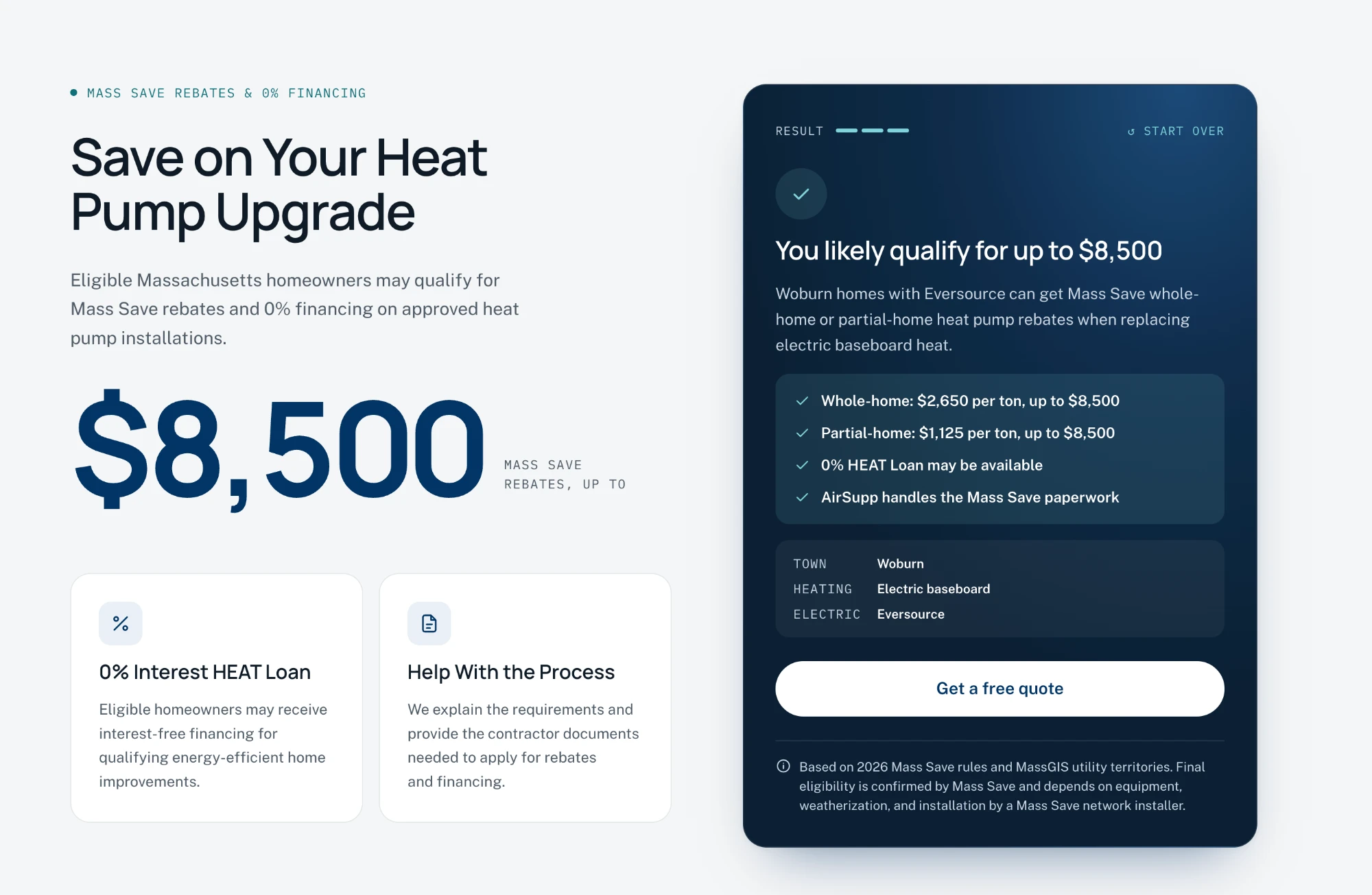
    Homeowners enter their ZIP code, heating type and utility, and get one of three results: likely qualifies, may qualify for local municipal rebates, or not eligible for Mass Save. Eligibility depends mainly on whether the utility is a Mass Save sponsor and what heating system the home has now, so a ZIP code alone isn’t enough. Every result says that Mass Save confirms final eligibility.

    The Mass Save section: a $8,500 rebate stat and the eligibility checker showing the result “You likely qualify for up to $8,500”.
  • Multi-step quote form

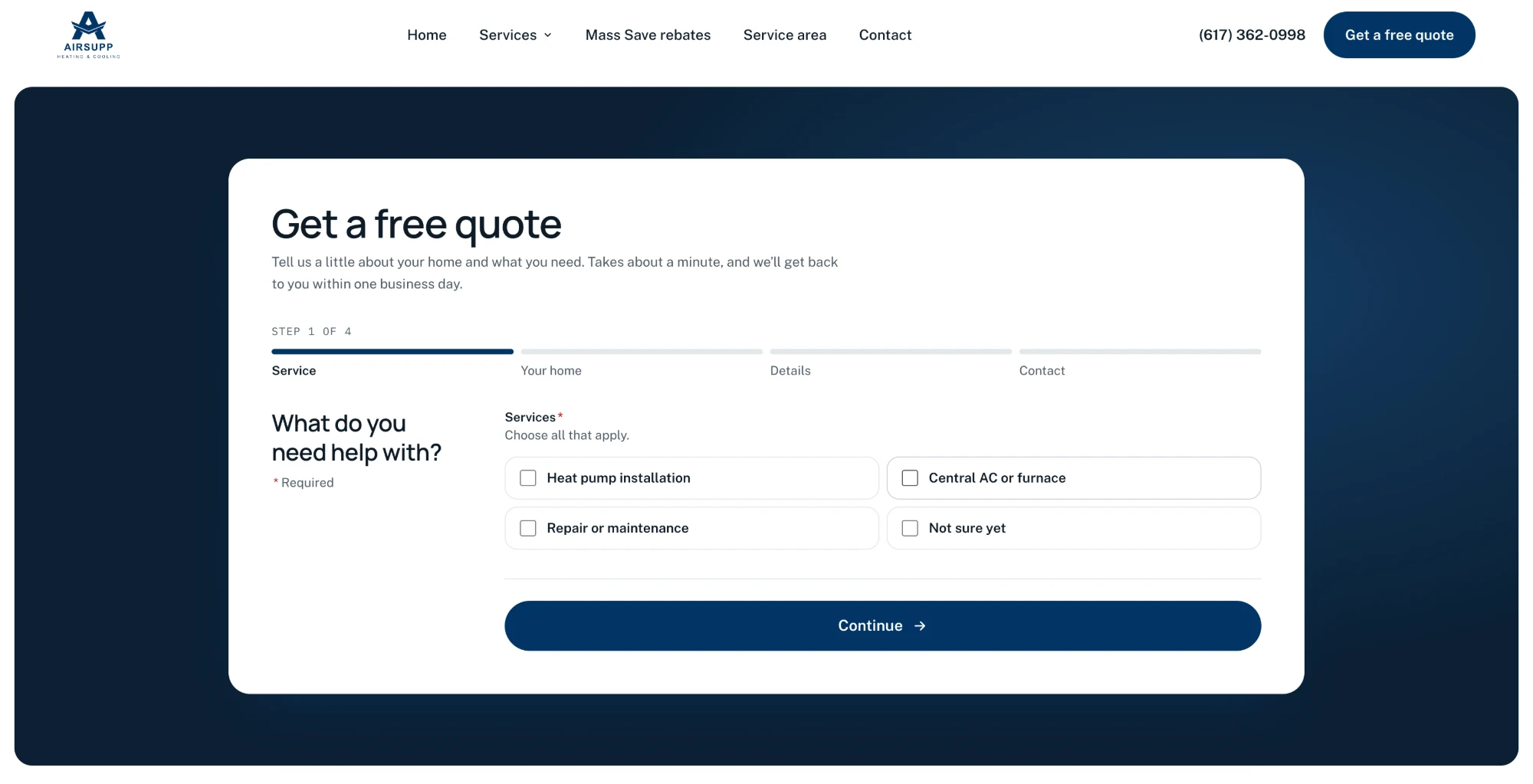
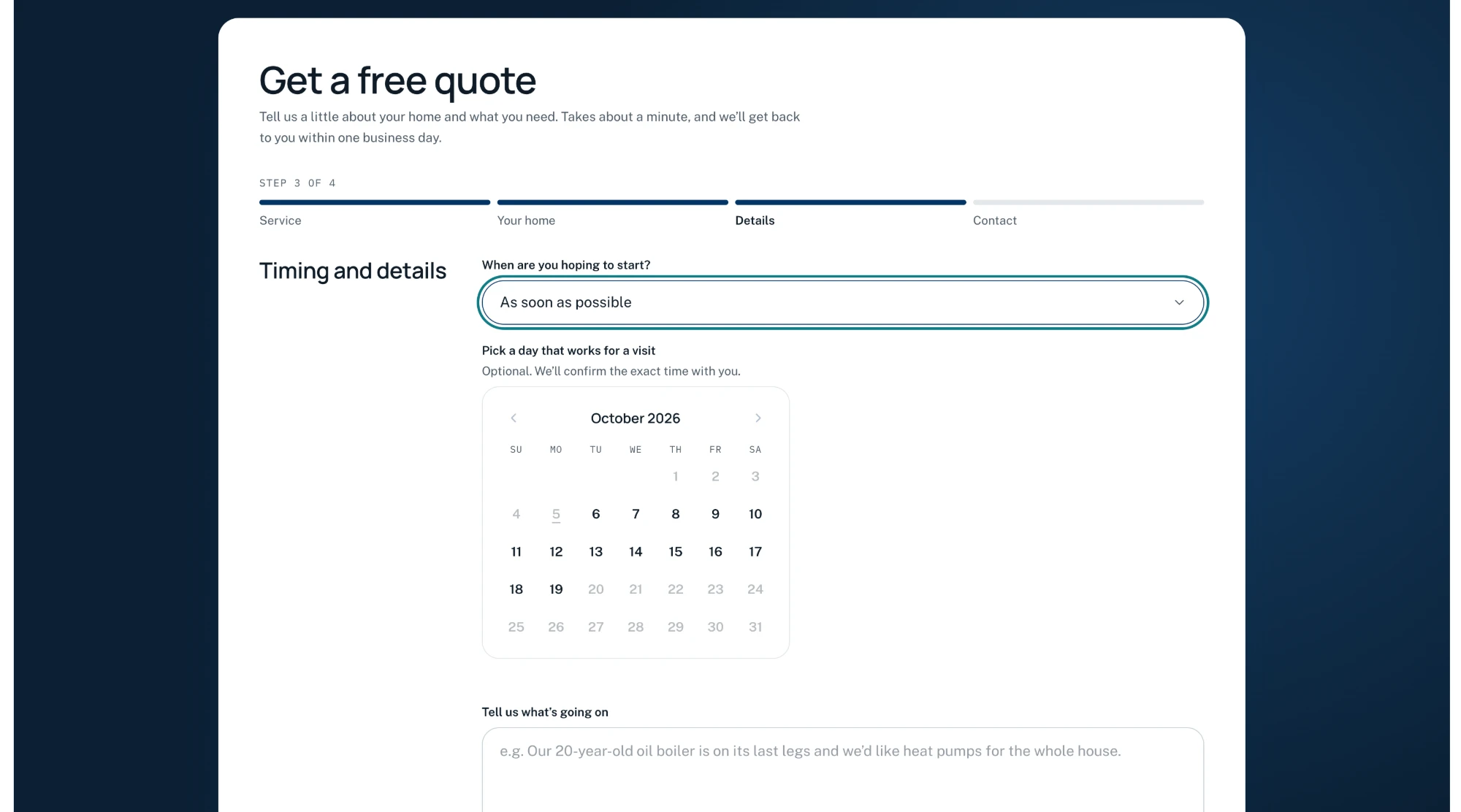
    Four steps (Service, Your home, Details, Contact) with a progress bar and validation at each step, so leads arrive complete. Submissions are emailed with Resend.

    Quote form step 1 of 4, “What do you need help with?”, with service checkboxes and a progress bar.
    Step 1 · Service
    Quote form step 3 of 4, “Timing and details”, with a start-time select and a calendar.
    Step 3 · Details
  • Services showcase

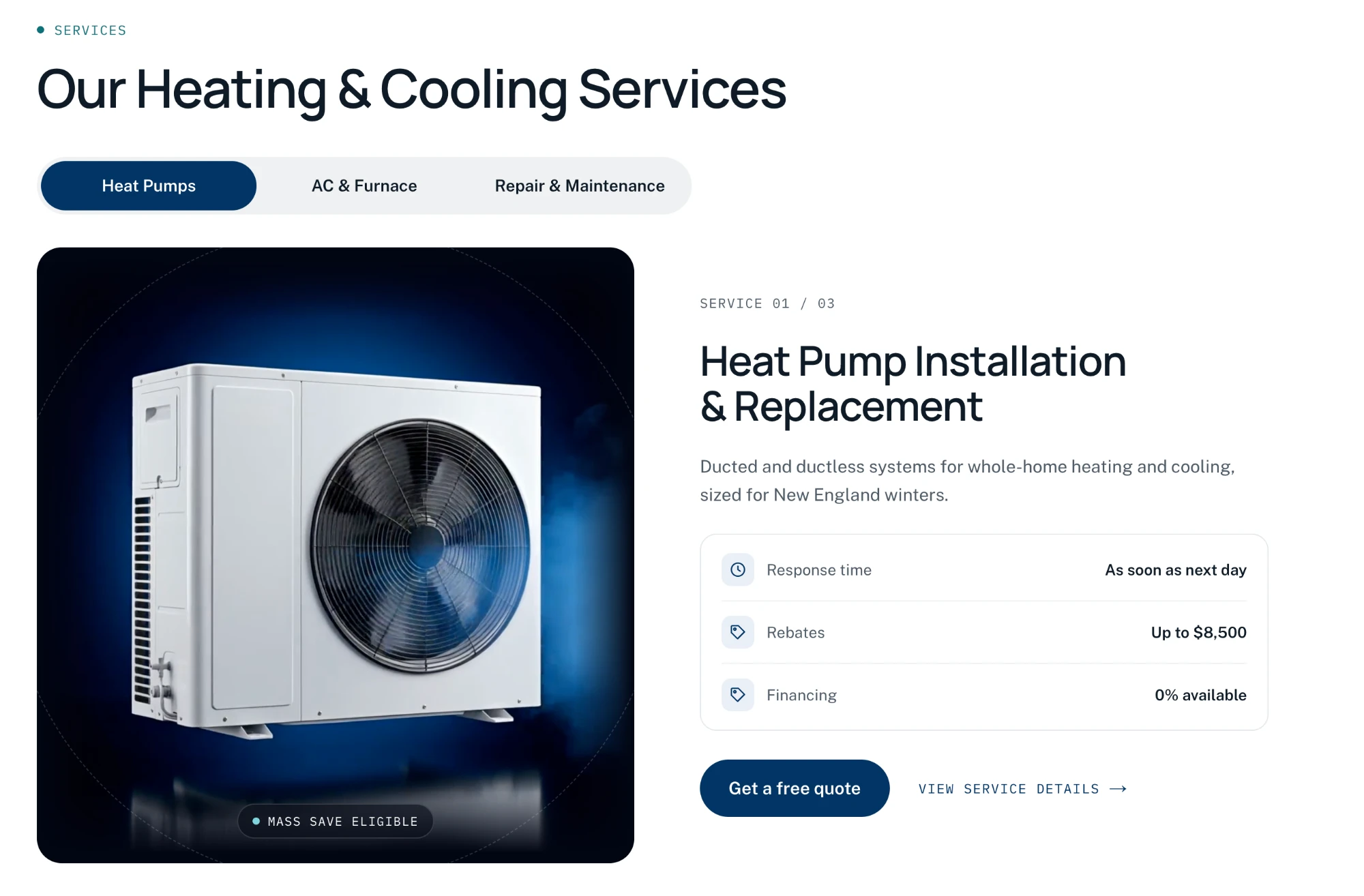
    A segmented toggle switches between three services. Each shows a looping product video on a dark stage and a spec card. It’s built as accessible tabs, with all panels rendered in the HTML for SEO.

    The services showcase: a tab toggle for Heat Pumps, AC & Furnace and Repair & Maintenance, with a heat pump product render and a spec card.
  • Google reviews

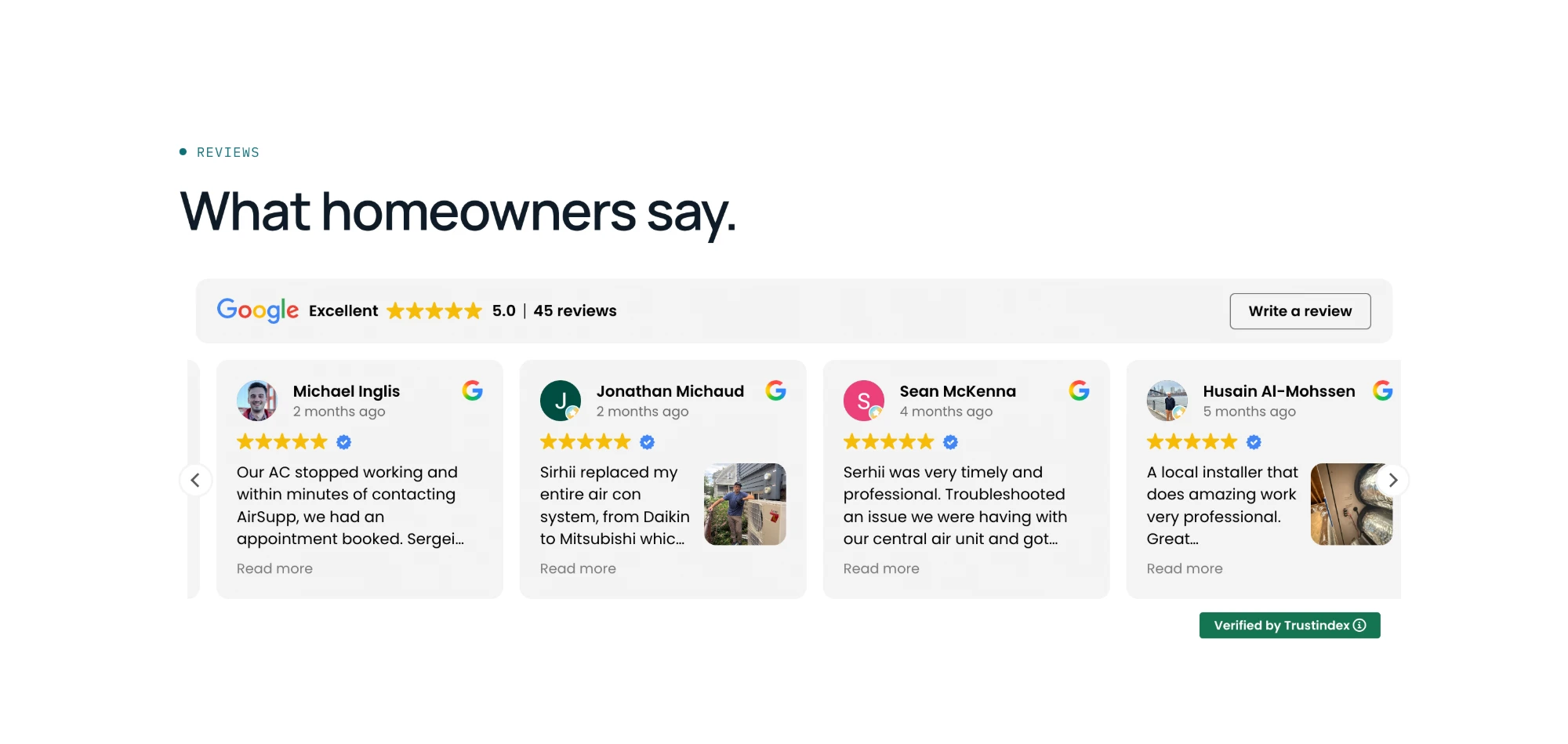
    I replaced a third-party widget that broke on client-side navigation with a custom section designed to match the site.

    The reviews section: a Google rating of 5.0 from 45 reviews, with four review cards.
  • Hanging CTA

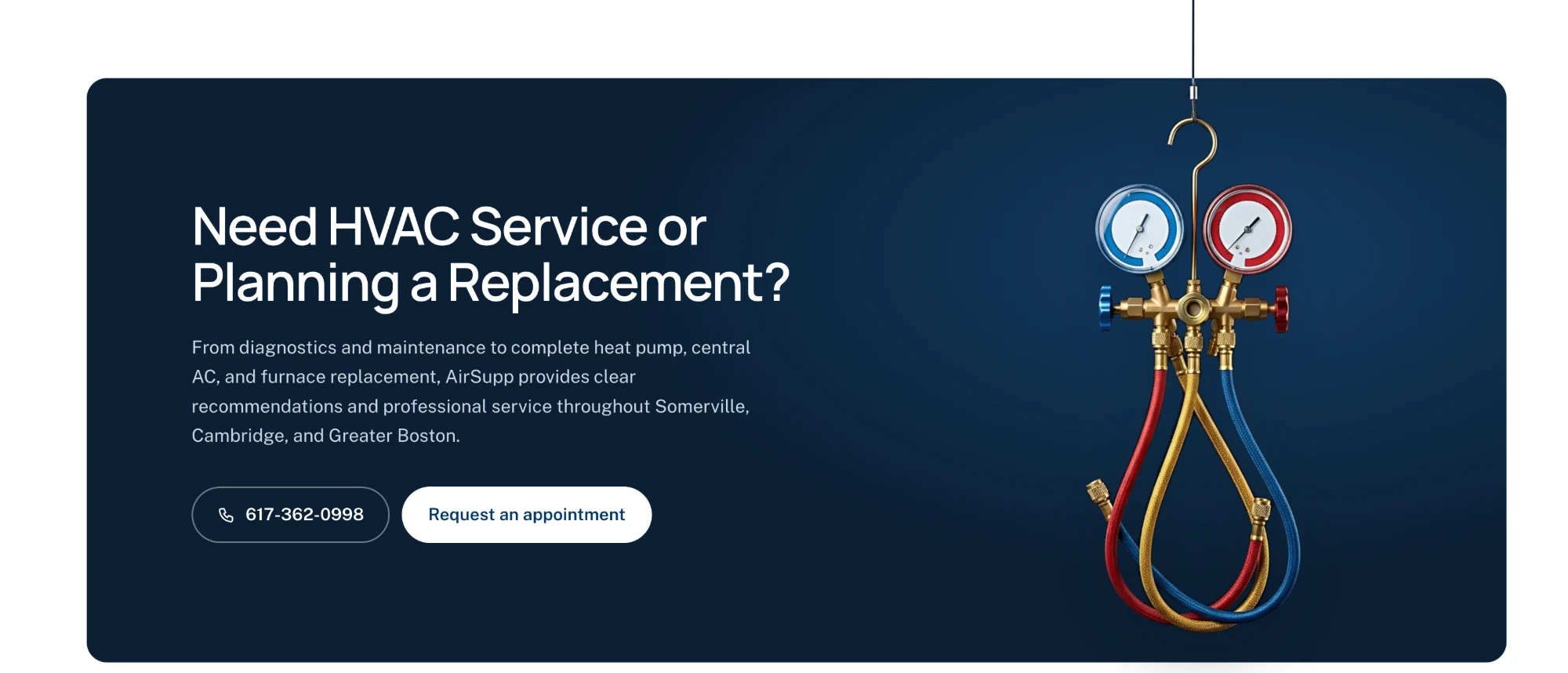
    The final call to action shows a manifold gauge set suspended into the section from a line above the card, with a gentle CSS sway.

    The final call to action: a manifold gauge set hanging from a line above a dark navy card that says “Need HVAC Service or Planning a Replacement?”
Visual assets

People are always real. Products can be AI.

Every photo of my dad, his van and his jobs is real. I used AI only for equipment renders and animations.

  1. Step 1

    One style reference

    Generated a clean studio still in Gemini (white unit, navy background, blue glow, no logos or text), then reused it as a style reference so every asset matched.

  2. Step 2

    Animate it

    Animated the still in Higgsfield with Kling 3.0: image-to-video, 1080p, with audio and prompt enhancement off.

  3. Step 3

    Process for the web

    Ran each clip through a reusable ffmpeg script (reverse, hold, ping-pong or crossfade loop) and exported MP4, WebM and a poster image, each under about 3 MB.

Engineering

Content apart from components.

A Next.js App Router site in strict TypeScript, so copy updates never touch UI code.

Architecture

  • Copy, services and rebate figures live in typed objects in /content. Components stay presentational.
  • Server Components by default. Client components only for tabs, the form and the checker.
  • One dynamic route, /services/[slug], renders all three service pages from services.ts and keeps the original URLs for SEO.
  • Design tokens in the Tailwind config and CSS variables. Fonts through next/font.

Quote form

  • Zod schemas shared by client and server: instant feedback in the browser, the same rules enforced on the server.
  • Submitted through a Next.js Server Action and emailed with Resend.
  • Spam protection with Cloudflare Turnstile and a honeypot field.

SEO and AI search

  • A unique title, meta description and H1 on every page, with canonical URLs, sitemap.ts and robots.ts.
  • JSON-LD: HVACBusiness on the home page and Service on each service page.
  • Semantic headings and accurate alt text, which also help AI search engines understand the business.

Performance and a11y

  • next/image for all images. Videos lazy-load with IntersectionObserver, posters first.
  • Moving and auto-advancing elements respect prefers-reduced-motion and have pause controls.
  • Keyboard-accessible tabs and accordions with ARIA attributes.
Launch

A DNS problem, solved.

The site went live on Vercel with DNS kept at GoDaddy, so my dad’s Google Workspace email was never at risk.

  1. www

    www.airsupp.org pointed to Vercel through a CNAME and verified immediately.

  2. Root domain

    The root domain failed verification. GoDaddy still held two A records for Framer’s IPs next to Vercel’s, so traffic was split between the old and new sites.

  3. The fix

    GoDaddy’s bulk delete threw a DNSZoneExternalNameserver error. Deleting the two old records one at a time was the fix path.

  4. Email

    All MX, SPF, DKIM and verification records stayed untouched. I avoided switching to Vercel nameservers on purpose.

  5. Fallback

    The Framer plan stays active until the new site is stable.

Results

Every score went up.

Desktop reached 100 across the board, and Total Blocking Time dropped from seconds to 30 ms.

Desktop performance
66 → 100
Mobile performance
60 → 90
Desktop Total Blocking Time
3,270 → 30 ms
ScoreMobile, before → afterDesktop, before → after
Performance60 → 9066 → 100
Accessibility86 → 10092 → 100
Best Practices92 → 10092 → 100
SEO69 → 10069 → 100
Total Blocking Time2,300 ms → 30 ms3,270 ms → 30 ms
Speed Index5.5 s → 2.3 s1.8 s → 0.8 s

Google PageSpeed Insights, Lighthouse 13.5, measured Sep 28, 2026.

Key decisions and lessons

AI sped up the work. People made it trustworthy.

AI sped up nearly every phase, but the decisions that made the site trustworthy were human ones.

DecisionWhy
Real photos of the owner, AI only for equipmentA fake technician would undercut an “owner-operated” brand.
Owner’s copy kept verbatimHe knows his customers. AI tools repeatedly tried to rewrite it, so I checked every section.
Rebuild, not export from FramerExported Framer code is unmaintainable, so I migrated the content instead.
Phased prompts with commits between themReviewable steps and easy rollbacks beat one giant prompt.
Eligibility checker phrased as an estimateMass Save makes the final call, so results never promise approval.
DNS kept at GoDaddyIt protected my dad’s email during the cutover.
Higgsfield Starter, monthlyEnough credits for the job. I ignored the repeated upsell timers.

What I’d do differently: lock the copy and the asset style reference before designing, and add layout-shift checks to the review of every section, not just at the end.

Keep exploring

More from this work.

Have a project in mind?

Tell me what you’re building. If I’m not the right fit, I’ll tell you that too.

or email hi@klep.dev
20-min intro call

Book a call

Pick a time that works for you. I’ll confirm by email with a meeting link.

Day

Time